
What makes Stylus different
Stylus changes how you build on Arbitrum by allowing smart contracts to be written in Rust, C, and C++. Unlike traditional EVM development, which is locked to Solidity or Vyper, Stylus compiles your code to WebAssembly (WASM). This means you can leverage the mature ecosystems, libraries, and tooling already familiar to systems programmers.
The key technical shift is the execution environment. Instead of running on the Ethereum Virtual Machine (EVM), Stylus programs run in a WASM environment that is integrated directly into the EVM. This integration is designed to be seamless: your Stylus contract can still interact with existing EVM contracts and tokens using standard EVM calls. You get the performance benefits of native code execution without sacrificing the interoperability that defines the Ethereum ecosystem.
This approach offers two distinct advantages. First, it opens the door to a much larger pool of developers who may not be familiar with Solidity. Second, it provides significant performance gains. WASM execution is generally faster and more efficient for complex logic than EVM bytecode, allowing for more sophisticated on-chain applications that were previously too costly or slow to deploy.
Set up the Rust development environment
To deploy your first Arbitrum Stylus contract in Rust, you need a clean local environment with the correct toolchain. This section walks you through installing Rust, initializing your project, and adding the Stylus SDK dependencies.
Open your terminal and install Rust using the official installer. This ensures you have the latest stable compiler and package manager.
curl --proto '=https' --tlsv1.2 -sSf https://sh.rustup.rs | sh
source "$HOME/.cargo/env"
rustup update
Verify the installation by checking the version:
rustc --version
cargo --version
Create a new library crate. Stylus contracts are compiled to WebAssembly (WASM), so we use the lib format rather than a standard binary.
cargo init --lib my-stylus-contract
cd my-stylus-contract
This creates a Cargo.toml file and a src/lib.rs file where your contract logic will live.
Edit your Cargo.toml to include the official Stylus SDK. This SDK provides the macros and types needed to interact with the Arbitrum EVM.
[dependencies]
stylus-sdk = "0.5.0"
ethers = "2.0"
The stylus-sdk crate handles low-level EVM interactions, while ethers is often useful for ABI encoding/decoding if you interact with other EVM contracts.
Stylus contracts must be compiled to the wasm32-unknown-unknown target. Add this target to your Rust installation:
rustup target add wasm32-unknown-unknown
You can now compile your contract to WASM:
cargo build --target wasm32-unknown-unknown --release
The compiled .wasm file will be located in target/wasm32-unknown-unknown/release/.
With the environment configured, you are ready to write your first Stylus contract. The next section covers the basic structure of a Rust-based Stylus smart contract.
Write and test your first contract
Arbitrum Stylus lets you write smart contracts in Rust, compiling them to WebAssembly (WASM) for execution on the chain. This approach provides access to Rust’s extensive ecosystem of libraries and tooling while maintaining compatibility with the Stylus runtime.
To begin, initialize a new Rust project and add the stylus-sdk dependency. This SDK provides the necessary macros and traits to define contract logic that Stylus can interpret. You will also need the motsu testing framework, which allows you to simulate the Stylus environment locally without deploying to a live network.
Set up the contract structure
Create a basic contract that exposes a simple state variable and a function to update it. Use the #[stylus_proc::entrypoint] macro to mark the entry point of your contract. This ensures the runtime knows where to start execution.
use stylus_sdk::prelude::*;

stylus_storage! {
    #[storage]
    pub struct MyContract {
        #[storage(layout)]
        value: u64,
    }
}

#[entrypoint]
impl MyContract {
    #[storage(layout)]
    pub fn set_value(&mut self, new_value: u64) {
        self.value = new_value;
    }

    #[external]
    #[storage(layout)]
    pub fn get_value(&self) -> u64 {
        self.value
    }
}
Write unit tests with Motsu
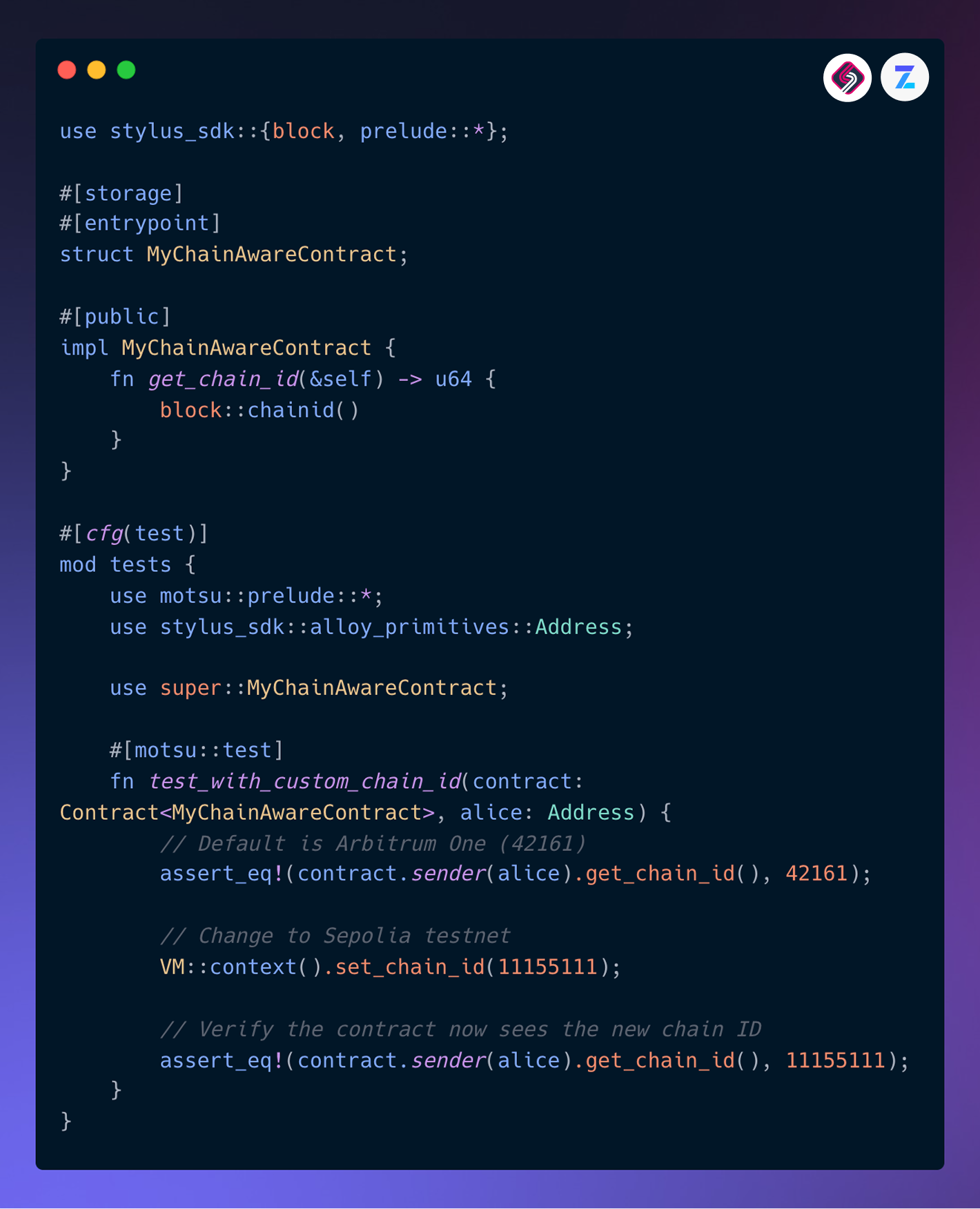
Motsu provides a testing environment that mimics the Stylus VM. Use motsu::prelude::* to access test utilities. Write tests that instantiate the contract, call its functions, and assert the resulting state.
#[cfg(test)]
mod tests {
    use super::*;
    use motsu::prelude::*;

    #[test]
    fn test_set_and_get_value() {
        let mut contract = MyContract::default();
        contract.set_value(42);
        assert_eq!(contract.get_value(), 42);
    }
}
Run these tests using cargo test. This command compiles the contract and executes the test suite within the simulated environment. If the tests pass, you have verified the core logic of your contract before moving to deployment.
Verify logic and coverage
Before deploying, ensure your contract handles edge cases and error conditions. Check gas estimates to ensure your contract fits within Stylus limits. Confirm that your test suite covers all critical paths and state transitions.
-
Verify contract logic handles all expected inputs
-
Check gas estimates for compliance with Stylus limits
-
Confirm test coverage includes edge cases and error paths
-
Run cargo test and ensure all tests pass
Once you have completed these steps, your contract is ready for deployment to the Arbitrum network.
Deploy to the Arbitrum testnet
Deploying an Arbitrum Stylus contract requires converting your Rust code into a WebAssembly (WASM) binary and then pushing that binary to the network. Unlike standard Solidity contracts that compile to EVM bytecode, Stylus contracts run as WASM modules within the EVM environment. This process uses the Stylus CLI to handle the compilation and deployment steps in one flow.
The deployment targets the Sepolia testnet by default, which is suitable for testing before moving to mainnet. You will need a funded wallet with Sepolia ETH to cover transaction fees. The CLI handles the interaction with the Arbitrum node, ensuring the WASM binary is correctly packaged and submitted.
First, ensure your Rust project is configured to compile to the wasm32-unknown-unknown target. Run the following command to build the WASM binary:
cargo build --target wasm32-unknown-unknown --release
This creates a .wasm file in your target/wasm32-unknown-unknown/release/ directory. The Stylus CLI expects this specific binary format to embed it into the deployment transaction.

If you haven't already, install the official Stylus command-line interface. This tool simplifies the deployment process by handling the complex interactions with the Arbitrum node.
cargo install stylus-cli
Verify the installation by running stylus --version. The CLI provides commands for both local testing and network deployment, making it the central tool for your Stylus workflow.
Use the stylus deploy command to push your contract to the Sepolia testnet. You will need to provide your private key and the path to your WASM binary. Ensure you have Sepolia ETH in your wallet to cover gas costs.
stylus deploy --private-key $PRIVATE_KEY --network sepolia target/wasm32-unknown-unknown/release/your_contract.wasm
The CLI will output the contract address upon successful deployment. You can verify the deployment on Sepolia Explorer using this address.
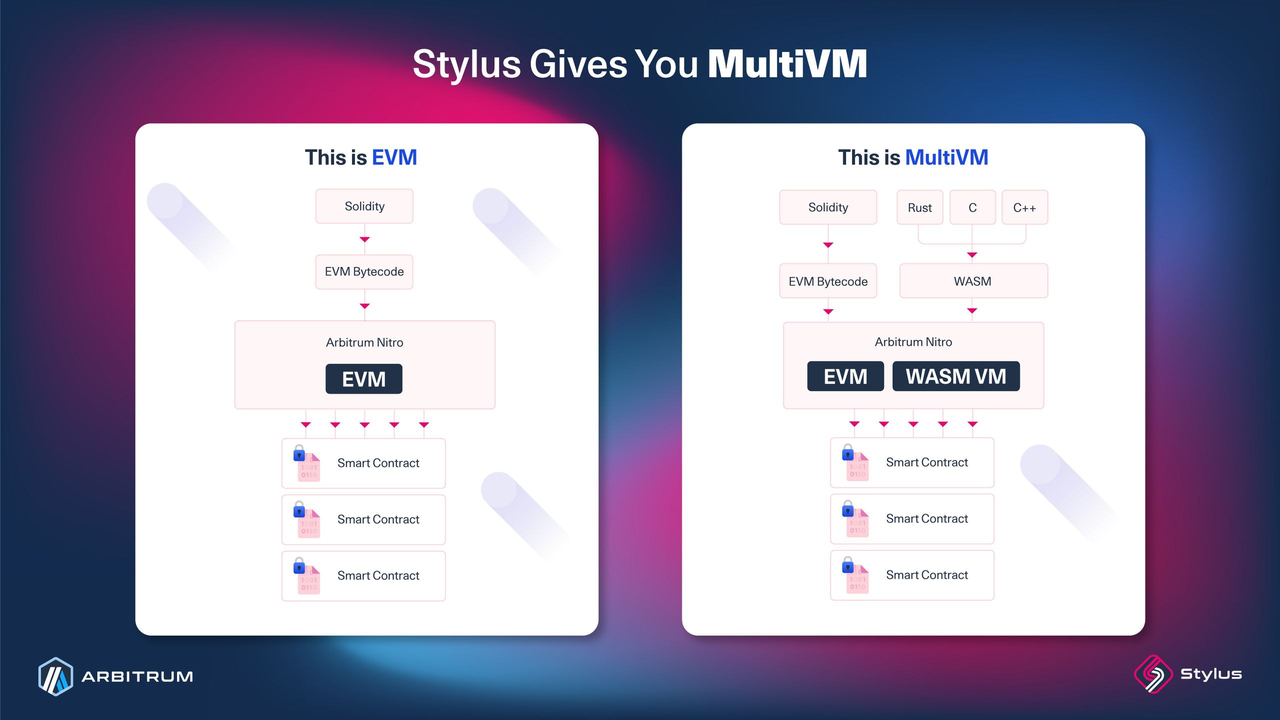
After deployment, verify that the contract is active on the testnet. You can interact with it using the Stylus SDK or standard Ethereum tools like Hardhat or Foundry. Check the transaction receipt on Sepolia Explorer to confirm the WASM binary was correctly uploaded and initialized.
Common pitfalls in Stylus development
Moving from EVM to Stylus requires shifting your mental model from gas-metered opcodes to raw WASM memory management. The most frequent error is assuming malloc behaves like Solidity's memory allocation. In Stylus, you are responsible for explicit memory cleanup. If you allocate memory inside a function but fail to free it, you create a memory leak that persists across calls, eventually causing the node to reject your contract due to resource exhaustion.
Gas estimation also behaves differently. EVM gas costs are predictable per opcode; Stylus gas is based on computational steps and memory access. A loop that runs 1,000 times in Rust might consume significantly more gas than a simple Solidity loop because each iteration involves WASM execution overhead. Use cargo stylus gas-estimate during development to get a baseline. If your local estimate differs wildly from on-chain behavior, check if your code is triggering unexpected state changes or heavy memory copying.
Another hidden trap is the handling of large structs. Passing complex types by value across the EVM-Stylus boundary triggers serialization costs. If you pass a large struct into a Stylus contract, the EVM must copy the data into WASM memory. This can exceed the block gas limit or cause transaction reverts. Instead, pass pointers or use smaller, flattened structs. Always validate input sizes before processing to avoid out-of-memory errors.
Finally, be cautious with panic handling. In Solidity, require reverts with a specific error. In Stylus, a Rust panic! reverts the transaction but may not provide the same detailed revert data to the EVM. If you rely on specific error codes for frontend handling, ensure you are using stylus_sdk::prelude::panic correctly and testing against a local Arbitrum node to see the exact revert payload.
Frequently asked questions about Stylus
What is Stylus on Arbitrum?
Stylus is an Arbitrum feature that enables writing smart contracts in programming languages like Rust, C, and C++. These languages compile to WebAssembly (WASM), allowing you to leverage existing ecosystem libraries and tools outside the traditional Solidity/EVM stack. It provides a way to access higher performance and a broader developer talent pool while maintaining EVM compatibility.
What is the main purpose of Arbitrum?
Arbitrum is an Ethereum Layer-2 scaling solution that uses optimistic rollups to improve speed, scalability, and cost-efficiency. It inherits Ethereum's security model while offering higher throughput and significantly lower transaction fees. Stylus builds on this infrastructure by allowing non-EVM languages to run efficiently on the network.
What are the risks of using Arbitrum?
Using Arbitrum involves several technical and financial risks. These include withdrawal delays, sequencer centralization risks, governance vulnerabilities, and liquidity constraints. Bridge security remains a critical concern, as does the risk of smart contract exploits or oracle failures. Users should also be aware of market volatility and token unlock pressures affecting the ARB token.
No comments yet. Be the first to share your thoughts!