
Why Stylus changes the game
Arbitrum Stylus introduces WebAssembly (WASM) support to the Arbitrum One chain. This allows developers to write smart contracts in general-purpose languages like Rust, C, and C++ instead of being limited to Solidity. You can now leverage existing developer talent and libraries while maintaining full compatibility with Ethereum infrastructure.
For Rust developers, this means you can use familiar toolchains like cargo and leverage the extensive Rust ecosystem, including crates like ethers-rs or alloy. You don't need to learn the EVM assembly or Solidity syntax to deploy on Arbitrum. The code compiles to WASM, which the Stylus runtime executes efficiently.
This shift matters because it lowers the barrier to entry. If you already know Rust, you can start building on Arbitrum immediately. You benefit from Arbitrum's low fees and high throughput without sacrificing the security guarantees of the underlying Ethereum layer. It is a practical upgrade for developers who want to write in languages they already know.
"Stylus represents a paradigm shift in smart contract development, introducing the ability to write blockchain applications in languages like Rust, C, and C++ while maintaining full compatibility with existing Ethereum infrastructure."
The key takeaway is simplicity and compatibility. You write Rust, compile to WASM, and deploy. The rest of the Ethereum ecosystem—wallets, explorers, and oracles—works with your contract out of the box. This is not a separate chain; it is Arbitrum, enhanced.
Set up your Rust environment
Before writing your first Arbitrum Stylus contract, you need a working Rust toolchain. Stylus uses the standard cargo build system, but requires the arb-stylus plugin to compile WebAssembly targets for the Arbitrum One network.
Follow these steps to install the necessary tools and verify your setup.
Install Rust using rustup. This command installs the Rust compiler, Cargo, and documentation locally.
curl --proto '=https' --tlsv1.2 -sSf https://sh.rustup.rs | sh
source "$HOME/.cargo/env"
Verify the installation by checking the version:
rustc --version

Stylus contracts compile to WebAssembly. Add the wasm32-unknown-unknown target to your Rust installation so Cargo can build for it.
rustup target add wasm32-unknown-unknown
Install the official arb-stylus plugin. This tool extends Cargo with commands specific to Stylus development, such as stylus build and stylus deploy.
cargo install arb-stylus
Confirm the plugin is installed correctly:
arb-stylus --version
Your environment is now ready to compile Rust code into Stylus-compatible WebAssembly modules. You can proceed to create a new project using the standard Cargo init command.
Write a simple Wasm contract
This section covers the core logic of an Arbitrum Stylus contract. We will build a basic counter that stores a single integer on-chain. This example demonstrates how to define storage, handle incoming transactions, and return data using the Stylus SDK.
The Rust Source Code
A Stylus contract is a standard Rust library compiled to WebAssembly (Wasm). The stylus-sdk provides macros and types that bridge Rust code with the EVM environment. Below is the complete source for a simple counter contract.
Key Components Explained
#[storage]: This macro tells the compiler to generate the necessary boilerplate for reading and writing to EVM storage. Each field in the struct corresponds to a 256-bit storage slot.#[entrypoint]: This marks the struct as the main contract interface. It allows the Stylus runtime to instantiate your contract.#[external]: Functions marked with this attribute are callable by external accounts or other contracts. They can modify state and return values. If a function does not modify state, use#[view]instead to save gas for the caller.StorageValue<T>: The Stylus SDK wraps standard Rust types.StorageValue<u64>ensures type safety when interacting with the blockchain's storage layer.
Configuration
Your Cargo.toml must target the wasm32-unknown-unknown architecture and link against the Stylus SDK.
The release profile settings are critical. Stylus contracts have a strict size limit (currently 24KB for the initial deployment, with some flexibility for upgrades). These settings strip debug symbols, enable link-time optimization, and minimize binary size to ensure your contract fits within the Wasm size constraints.
Test locally with Motsu
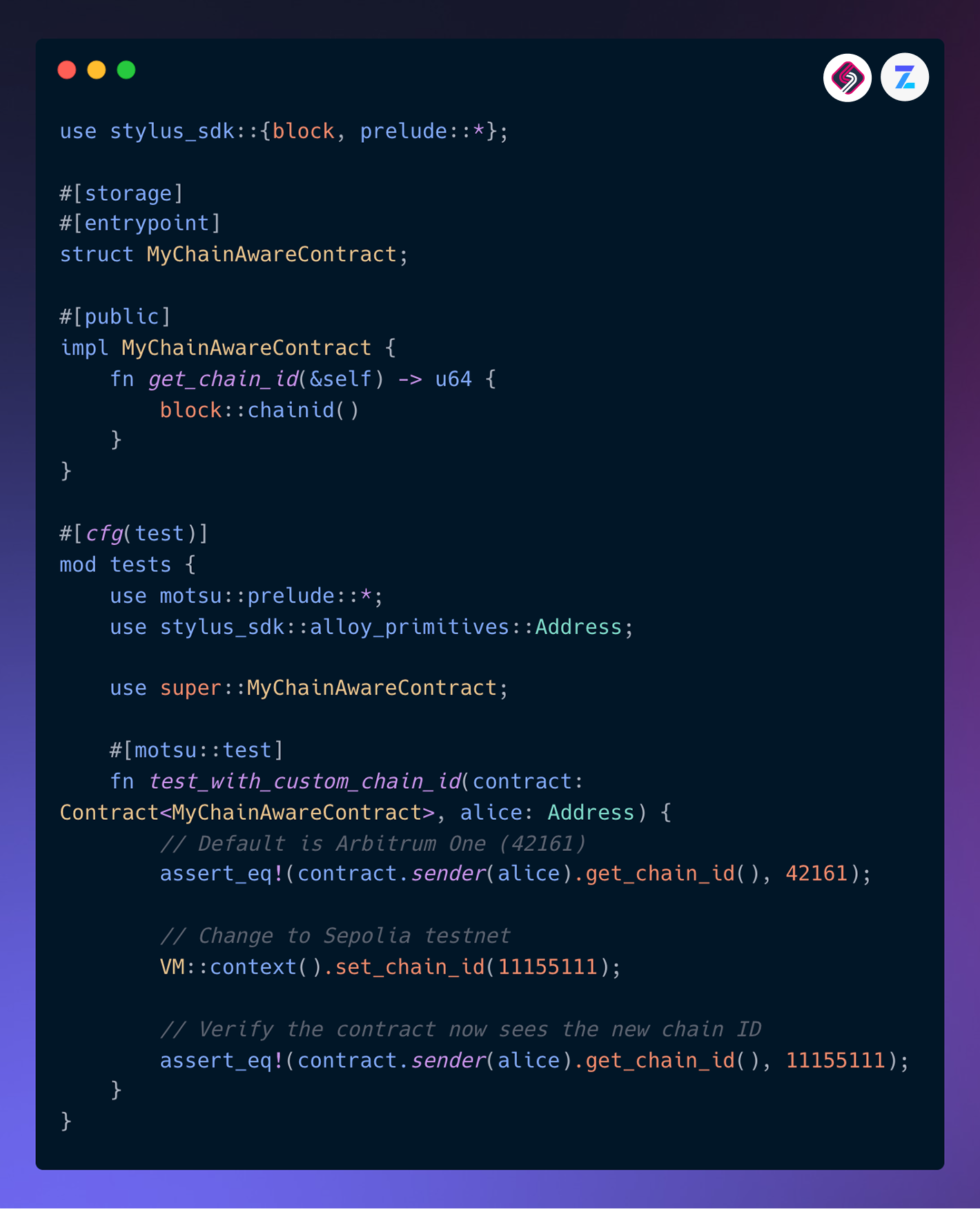
Before deploying to the mainnet, verify your Rust contract logic using Motsu. This framework allows you to execute your compiled WebAssembly (Wasm) module locally, simulating the Arbitrum environment without incurring gas fees or waiting for block confirmations. It catches logic errors and state management issues early in the development cycle.
To begin, ensure you have the motsu binary installed. You can typically install it via Cargo if it is available as a crate, or download the pre-built binary from the official repository. Once installed, you will need to compile your Stylus contract into a .wasm file using cargo build --release.
Run the local test suite by pointing Motsu to your compiled binary. This command spins up a local node, loads your contract, and executes the test functions defined in your Rust code. The output will show pass/fail statuses for each test case, allowing you to iterate quickly.
Pre-deployment verification checklist
-
Compile contract with cargo build --release
-
Verify .wasm file size is under limits
-
Run motsu with all unit tests passing
-
Test edge cases in local environment
-
Review gas estimation for critical functions
Deploy to Arbitrum One
With your Rust code compiled into a Wasm binary, the final step is pushing it to the Arbitrum One mainnet. This process relies on standard EVM-compatible tooling, meaning you can use familiar wallets and RPC endpoints to broadcast the deployment transaction.
1. Configure Your Environment
Before deploying, ensure your development environment points to the Arbitrum One RPC endpoint. You will need your wallet’s private key (kept secure) and the network ID for Arbitrum One (42161). Most developers use .env files to manage these secrets locally.
2. Broadcast the Deployment Transaction
Use a deployment script or CLI tool to send a transaction containing your Wasm binary as the contract code. The transaction must be signed with your private key and directed to the Arbitrum One network. Once the transaction is confirmed, your Stylus contract is live and ready to accept calls.
Initialize your web3 provider with the Arbitrum One RPC URL (https://arb1.arbitrum.io/rpc). Verify the connection by checking the network ID (42161) and your account balance.
Send a transaction to a new contract address. Set the initcode field to the raw bytes of your compiled .wasm file. This action triggers the Stylus runtime to load and initialize your Rust contract.
After the transaction confirms, use a block explorer like Arbiscan to verify the contract. Check that the code hash matches your Wasm binary and that the contract is executable via standard EVM calls.
Common questions about Stylus
What is a Stylus in Arbitrum?
Arbitrum Stylus is a feature that allows developers to write smart contracts in languages like Rust, C, and C++. These languages compile to WebAssembly (WASM), which the Arbitrum Nitro execution environment runs alongside EVM bytecode. This means you can use familiar, high-performance languages to build on Arbitrum while maintaining full compatibility with existing Ethereum infrastructure and tooling.
What is the purpose of Arbitrum?
Arbitrum is a Layer 2 (L2) scaling solution for Ethereum. It uses optimistic rollup technology to process transactions off-chain, settling only the final state on the Ethereum mainnet. The primary purpose is to improve speed, scalability, and cost-efficiency. By batching transactions, Arbitrum offers significantly higher throughput and lower fees compared to Ethereum, while inheriting Ethereum’s security guarantees.
Can I use Solidity with Stylus?
Yes. Stylus and the EVM coexist on the same chain. You can deploy Solidity contracts (compiled to EVM bytecode) and Stylus contracts (compiled to WASM) side by side. They can interact with each other, allowing you to gradually migrate or integrate new functionality written in Rust or C++ without replacing your existing Solidity infrastructure.
Is Stylus secure?
Stylus contracts run in a sandboxed WASM environment. This isolation ensures that a Stylus contract cannot access the EVM state directly or interfere with other contracts. The Nitro VM validates WASM execution, ensuring that all computations adhere to the same security and determinism rules as the EVM. This design preserves the trust model of the Arbitrum network.
No comments yet. Be the first to share your thoughts!